
Problem
When I tried to open a project, and then select a media, and choose to SEARCH or BROWSE ALL, the system just sits waiting for the page to load. After a couple of trouble shoot I realised that the search services was not running. Therefore where can we check from the UI the health status of Search servers?
Resolution
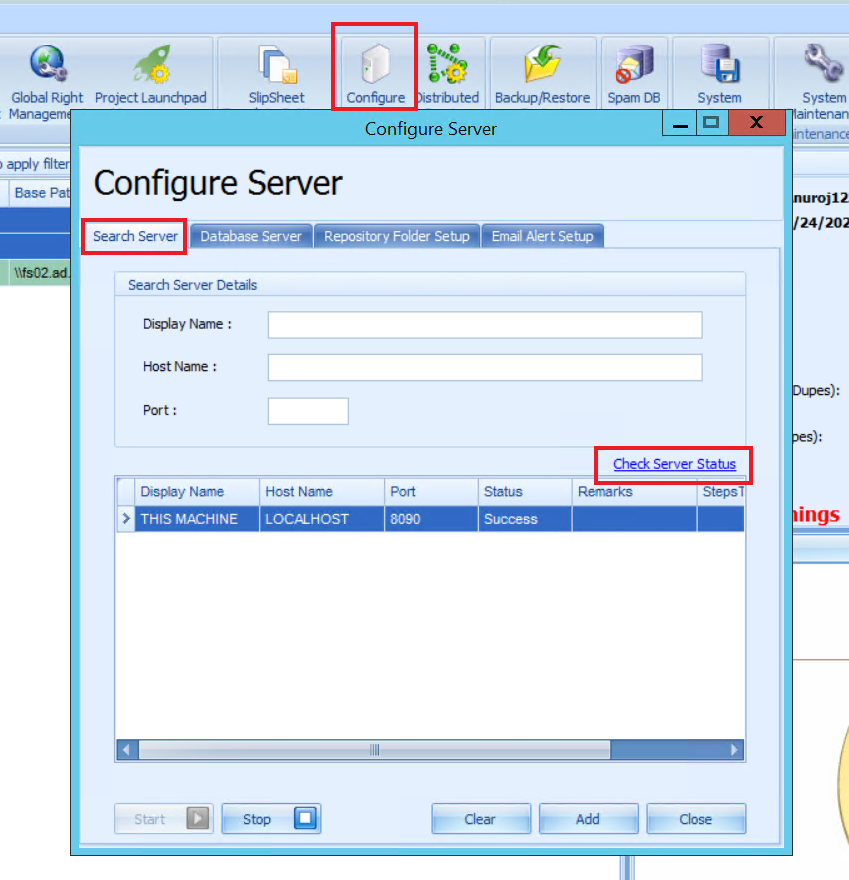
We can check the Search Server status from the UI in the following way:
Navigate to Administration>>Configure server>>Searchserver and then click on the Check Server Status link.
The other reason this page would take time to load is the Search result page size set in the user setting is too high. We recommend to set it to 20. This setting can be adjusted from
Click on the user name>>User Settings>>User Preference
Set the search result page size.
Comments
1 comment
How do I find this setting in VenioWeb 8.4.0
Please sign in to leave a comment.